A Guided Prompting Interface for Supporting Creative Intent in AI Image Generation
초록
Background Recent advances in generative artificial intelligence (AI) have expanded the accessibility of text-to-image creation. However, novice users still face substantial challenges when using such systems. Beginners often struggle to translate abstract visual intentions into effective prompts due to unstructured prompt composition, difficulties in articulating abstract visual attributes, and the unpredictability of generated outcomes. Accordingly, this study aims to propose a guided prompt interface designed to systematically support novice users in structuring and controlling their creative intent during AI-based image generation.
Methods This study employed a combination of formative and experimental research approaches. First, a formative study involving 16 novice users was conducted using observational tasks and in-depth interviews to identify key difficulties and user needs in existing text-to-image generation tools. Based on these findings, prior literature, and an empirical analysis of 100,000 real-world user prompts, a six-category framework—Subject, Style, Artistic Reference, Composition, Mood, and Tone—was developed to define the core components of effective prompts. An interface integrating a step-by-step guide, visually represented filters, and a generative pre-trained transformer (GPT)-assisted prompt recommendation feature was then designed based on this framework. Finally, a comparative user study with 16 participants was conducted to evaluate the proposed interface against Midjourney using Computer System Usability Questionnaire (CSUQ) and qualitative interaction analysis.
Results The formative study revealed that novice users experienced difficulties in structuring prompts, expressing abstract visual attributes, and anticipating system outputs. The proposed method addressed these challenges by enabling users to construct prompts using 65 visually represented filters organized within a step-by-step workflow. Comparative evaluation results showed that the proposed interface significantly outperformed Midjourney in overall usability, particularly regarding ease of use and clarity of information organization. Qualitative findings further indicated that the structured interface improved users’ confidence, reduced trial and error, and enhanced the predictability of generated images by aligning them more closely with users’ intended visual characteristics.
Conclusions This study builds upon existing AI image generation technologies by proposing a unified, step-by-step interface that structures creative intent and enhances user control throughout the image generation process. By reducing cognitive burden, the proposed interface helps novice users articulate and manage their creative decisions more clearly and effectively. Future research should incorporate open-ended creative tasks and longitudinal user evaluations to further investigate how structured guidance can coexist with creative flexibility in human–AI collaboration.
Keywords:
Generative AI, Text-to-Image Generation, Prompt Engineering, Human-AI Collaboration, Interface Design1. Introduction
Recent advancements in AI language and generative models have not only transformed natural language processing but have also revolutionized the creation of digital art. Models such as ChatGPT, Gemini AI, and Midjourney have demonstrated the ability to generate high-quality images from textual descriptions (Oppenlaender, 2023; Ramesh et al., 2022). With the global generative AI market projected to expand at an average annual rate of 34.2% from 2023 to 2032 (Polaris Market Research, 2024), there is an ever-growing demand for tools that empower creative practitioners across diverse disciplines.
Despite the remarkable progress in AI powered image creation, current systems—such as Midjourney, DALL·E 3, and Stable Diffusion—rely heavily on text-based prompts. Users are required to engage in extensive prompt engineering, refining their textual inputs iteratively to steer the generated images toward a desired artistic vision (Dang et al., 2022; White et al., 2023). This approach, however, poses significant challenges for digital creatives. The inherent unpredictability of AI-generated images and the steep learning curve associated with crafting effective prompts can hinder creative exploration, particularly for users who are not well-versed in the technical nuances of prompt formulation (Oppenlaender, 2022; Brand et al., 2023).
To address these challenges and unlock the full creative potential of generative AI, this study introduces the proposed method, a novel and interface-centered prompt creation tool designed for digital creativity. Moving beyond conventional text-based input approaches, the proposed method incorporates an intuitive, step-by-step visual guide that assists users in constructing effective prompts. By integrating visual filters, hierarchical prompt categories, and AI-assisted creative recommendations, the proposed method reduces trial-and-error while fostering experimentation and artistic expression.
2. Related Works
2. 1. Foundations of AI and Digital Creativity
Recent advances in artificial intelligence have laid the groundwork for transformative digital creative tools. Large Language Models (LLMs) such as ChatGPT, Gemini AI, and others have revolutionized natural language processing by generating human-like text from vast datasets (Balse et al., 2023; Zhou et al., 2022; Zhao et al., 2023). The launch of ChatGPT in November 2022—attracting over 100 million users within two months (OpenAI, 2023; Brown et al., 2020)—underscores the accessibility of these models even for non-expert users.
Simultaneously, breakthroughs in text-to-image generation, exemplified by systems like Midjourney, DALL·E, and Stable Diffusion, employ techniques such as CLIP and diffusion models to convert textual descriptions into high-quality images (Pavlichenko & Ustalov, 2023; Zhang et al., 2023). These technological advancements have not only expanded the technical capabilities of generative systems but have also reshaped artistic practices and creative workflows, as discussed in studies on computational creativity (Boden, 2004) and digital art practices (McCormack et al., 2019).
2. 2. Challenges in Text-to-Image Generation Models
Despite these breakthroughs, crafting effective prompts remains a significant hurdle. As noted by Evirgen et al. (2024), the iterative trial-and-error process for prompt refinement places a heavy burden on digital creatives. Morris (2024) in “Prompting Considered Harmful” argues that free-form text prompts are ambiguous and often obscure system affordances, suggesting that more constrained, visually guided interactions could better support users. Interactive systems such as PromptCharm (Wang et al., 2024), Promptify (Brade et al., 2023), and PromptMagician (Feng et al., 2023) offer alternatives by integrating multi-modal feedback to guide users in refining their prompts more intuitively, highlighting the need for user-friendly interfaces that lower cognitive load.
The design of interactive AI image generator is evolving to better support digital creativity. While traditional text-only systems and hybrid models that combine text with visual style filters offer distinct advantages, they still require a baseline of technical and artistic expertise. The literature reveals a gap for interfaces that merge technical robustness with creative freedom—simplifying prompt formulation while fostering artistic expression. Research on human–AI collaboration and creative interfaces (McCormack et al., 2019) suggests that well-designed systems can empower users through both structure and flexibility, while design studies on transparency and user trust (Sengers et al., 2007; Hassenzahl, 2010) underscore the need for clear communication of system affordances.
3. Research Design and Methodology
3. 1. Research Objectives and Scope
This study aims to develop and evaluate the proposed method, a novel prompt generation tool designed to support digital creativity in AI-based image generation. The primary objective is to create an interface that enhances accessibility and usability for novice digital creatives while simultaneously fostering artistic expression. Unlike existing services that rely solely on free-form text inputs, the proposed method employs a step-by-step, visually guided approach to reduce trial-and-error and help users more effectively articulate their creative intentions. This work seeks to contribute to the broader understanding of human–AI collaboration in creative practices and to inform the design of digital tools that better bridge technology and art.
3. 2. Research questions
The research questions of this study were formulated based on gaps identified in prior research on text-to-image generation systems, human–AI collaboration, and HCI-based evaluation of interactive creative tools. Previous studies have consistently reported that novice users experience substantial difficulties when composing prompts, including high cognitive load, ambiguity in system affordances, and challenges in translating abstract creative intent into effective textual inputs (Oppenlaender, 2022; Evirgen et al., 2024; Morris, 2024). These findings suggest a clear need for interface-level interventions that go beyond linguistic prompt optimization.
In addition, HCI research emphasizes the importance of evaluating interactive systems not only in terms of technical performance, but also through user-centered criteria such as usability, information clarity, interface quality, and support for meaningful user engagement (Lewis, 1995; Hassenzahl, 2010). More recent work on human–AI interaction further highlights the role of structured guidance, transparency, and user control in enabling effective collaboration between users and AI systems, particularly in creative contexts (Amershi et al., 2019).
Grounded in these perspectives, the research questions were designed to systematically examine three interrelated dimensions: (1) the prompt-related challenges encountered by novice users, (2) the user experience and interface elements required to support creative expression, and (3) the impact of structured, visually guided interaction on creative outcomes in comparison with existing text-based systems. Accordingly, the following research questions are addressed:
RQ1: What challenges do novice digital creatives encounter when composing prompts for AI image generation, and how can improved interface design help mitigate these difficulties?
RQ2: Which key user experience elements and interface features are essential for supporting artistic expression within a prompt generation tool?
RQ3: How does the proposed method influence the quality and creative appeal of images generated by novice users compared to existing text-to-image systems?
3. 3. Methodology
The study is conducted in two phases: a formative study and a controlled evaluation.
The formative study begins with qualitative research—including semi-structured interviews and observational sessions—with a diverse group of novice digital creatives. Participants are recruited based on criteria such as limited prior experience with generative AI in creative contexts, and demographic information (e.g., age, education, creative background) is systematically documented. The goal of this phase is to uncover pain points, desired features, and user expectations related to the prompt creation process. The collected data are analyzed using thematic analysis to identify common challenges, which subsequently inform the design of the proposed method.
In the subsequent phase, a mixed-methods evaluation is conducted to compare the proposed method with a baseline text-based prompt system. A broader sample of participants, representing varied creative and demographic backgrounds, is recruited. Participants complete creative tasks using both systems, and quantitative measures (e.g., task completion time, creativity ratings, satisfaction scores) are collected alongside qualitative feedback through follow-up interviews. Statistical analyses are performed to compare performance across conditions, while qualitative data are coded to extract insights regarding usability and creative impact.
4. Formative Study: Understanding Beginner Needs in AI Image Generators
This formative study aimed to identify the primary challenges novice users face when composing prompts for AI image generation and to inform the initial design requirements for the proposed method. An observational approach combined with in-depth interviews was adopted to capture both the processes and pain points experienced by novice digital creatives.
4. 1. Method
A total of 16 participants (8 males, 8 females) were recruited, all of whom had interacted with AI image generators between one and five times (Table 1). Participants with zero experience were excluded to ensure they could meaningfully explore the tools while still exhibiting novice behaviors. This recruitment criterion drew on Pirolli and Card’s (1999) Information Foraging Theory, which indicates that users with fewer than five interactions typically engage in exploratory behaviors rather than forming systematic strategies. Likewise, Luger and Sellen (2016) highlight that users with limited AI experience often encounter a gap between expectations and real-world performance, underscoring the need for structured guidance. Participants were recruited using a snowball sampling approach, beginning with individuals who met the selection criteria, followed by recruitment through social networking services and graduate school communities. Participation was entirely voluntary, and eligible participants were selected from those who expressed interest. The study was conducted between October 1 and October 31, 2023. Each session lasted approximately 50 minutes and included both experimental tasks and a semi-structured interview. All sessions were conducted individually and in person, at a time and location convenient for the participant.

Participant demographics and prior experience with AI image generators
Each participant began by exploring AI image generation tools—Midjourney, Playground, and DALL·E—along with community resources like the Creation feed (a repository of user-generated prompts, parameters, and images). Participants were then guided through five observational tasks (Table 2), each designed to evaluate how they composed prompts and adapted their strategies under different interface constraints. Following these tasks, participants took part in in-depth interviews, focusing on their initial goals, alignment with expectations, and any challenges encountered.
Overview of observational tasks
To assess prompt writing abilities and identify areas for improvement, the five tasks include:
- 1. Generate an image closely matching a reference provided by the researcher using only text prompts.
- 2. Transform the generated image into a Van Gogh–inspired style by modifying the prompt.
- 3. Experiment with style filters to produce a personally desired image, gauging the impact of pre-defined visual options on creative outcomes.
- 4. Reference prompts and images in the Creation feed to replicate or adapt an appealing style.
- 5. Leverage automated prompt suggestions to refine an existing prompt and observe how these suggestions shape creative decisions.
Upon completing the tasks, each participant took part in a 20-minute interview. These sessions provided qualitative insights into user behaviors, pain points, and contextual factors influencing prompt creation. A thematic analysis of the interview transcripts was conducted to distill user needs, which subsequently guided the design of the proposed method’s step-by-step interface.
4. 2. Results
All interviews were audio-recorded, transcribed verbatim, and repeatedly reviewed. Meaningful statements related to participants’ experiences with prompt creation were extracted and organized using an affinity diagramming approach. These statements were iteratively grouped based on semantic similarity, allowing patterns to emerge directly from the data. The resulting clusters were refined into higher-level themes—(1) Prompt Writing Ability and (2) Functions to Improve Prompt Utilization Ability—which structured the Results section.
① Difficulty in Writing Specific Prompts
Participants frequently found it challenging to determine the optimal length, wording, and technical details required for crafting effective prompts. They also encountered difficulty navigating platform-specific commands and features.
“I had to use Discord commands (for Midjourney), but I didn’t know which ones were available. It was difficult to use the prompts correctly.” (P2)
“I don’t know how long or detailed my prompt should be or which elements I should include for producing a good image.” (P6)
② Difficulty in expressing abstract ideas
Translating abstract concepts or mental images into precise text descriptions proved especially difficult. Expressing mood or style nuances often resulted in vague or overly general prompts.
“When I had to write the prompt myself, it was hard to convert the image in my mind into words.” (P10)
“I thought I had described the image in detail, but I wasn’t precise enough. Choosing the right words for style, composition, and mood was very difficult.” (P9)
③ Language barriers and nuance conveyance
Non-native English speakers noted that subtleties in their intended meaning were sometimes lost during translation or rephrasing, leading to unintentional mismatches between their ideas and the generated outputs.
“The nuance of the words I wanted to express changed during the translation process from Korean to English.” (P3)
“My idea of ‘concept art’ is a simple sketch focusing on the character, but the AI understood it as a more refined image. It handles complex images well, but struggled to produce rough, simpler sketches.” (P15)
① Filter utilization
Participants generally appreciated the straightforward style filter approach in Playground. By selecting pre-defined filters with sample images, they could bypass extensive text-based prompt crafting.
“I liked not having to write out the prompt directly since the expected style of the image was generated through the filter.” (P10)
However, the limited variety and ambiguous naming of filters sometimes hindered the user experience, restricting the range of creative possibilities.
“There weren’t many filters, so it was limiting. Also, some filter names were confusing. For example, I tried ‘Warm box’ but had no idea what style that would produce.” (P8)
② Creation feed utilization
Having access to verified prompts and corresponding images helped participants quickly replicate or adapt styles without the need for extensive trial and error.
“By referencing the prompts of well-made images, I was able to create the desired images quickly and easily. I think it would have been difficult to create them without referring to the prompts in the creation feed.” (P4)
③ Prompt Recommendation
Users found AI-generated suggestions, especially via ChatGPT in DALL·E, beneficial when they lacked ideas or struggled with linguistic nuances. The tool often refined their rough concepts into more detailed and coherent prompts.
“I sometimes struggle with English nuances, but the AI was helping me with that difficulty. It felt like the AI was refining what I wanted to express in more detail.” (P5)
However, some participants also mentioned the risk of overly verbose suggestions that diluted the main creative intention.
“The GPT-generated sentences were quite long, which made it hard to grasp the main idea. I had to revise them to capture my core intention.” (P10)
Overall, these findings underscore the tension between ease of use and creative control. While filter-based or AI-driven aids can streamline prompt creation, users also desire more transparency and personalization to effectively realize their artistic visions.
4. 3. Discussion
This formative study illuminates how novice users approach AI-driven image generation and, more broadly, how they aspire to express their creative visions through digital tools. Although the initial focus centered on improving prompt usability, the findings underscore a deeper need to empower users’ artistic processes. The following sections discuss three overarching strategies—drawn from both user feedback and prior research—that inform the design of interactive systems aimed at fostering digital creativity.
While prior text-to-image services (e.g., Midjourney, Playground, DALL·E) rely heavily on free-form prompts, many beginners struggled with prompt composition and structure. This gap often led to suboptimal results, undermining user confidence. Rather than merely fixing usability issues, the step-by-step approach adopted in this study seeks to democratize creative expression by scaffolding each phase of prompt writing. Research in user experience design shows that structured guidance can mitigate complexity and uncertainty in sophisticated systems (Grossman et al., 2009). Applying these insights to a creative context enables novices to iteratively refine their ideas, effectively bridging the gap between conceptual imagination and final output. Future investigations incorporating open-ended tasks may further expand users’ sense of creative freedom by allowing exploration of personally meaningful artistic visions rather than reproducing a single reference image.
Participants reported that stylistic or thematic exploration became easier when visual cues or filters were available. Although Playground’s single-filter approach reduced entry barriers, users expressed a desire for greater variety and clearer filter naming. A multi-filter selection mechanism therefore holds promise as a method for guiding novices in combining artistic styles, effectively bridging purely textual prompting with more visually oriented workflows.
In addition, community feeds were highly valued, providing real-world examples of creative outputs. Within the context of digital creativity, such community-generated prompts can inspire new directions and reduce the intimidation often experienced during early creative exploration. By integrating these features into the proposed method, the goal extends beyond streamlining functionality toward broadening users’ creative potential.
Findings indicate that AI-driven prompt recommendations (e.g., via ChatGPT) do more than resolve linguistic challenges: they can stimulate new creative ideas and encourage users to expand beyond their initial concepts. Non-native English speakers, in particular, noted the value of nuanced vocabulary suggestions that helped refine their artistic goals. However, the risk of overly verbose or tangential AI-generated prompts highlights the need for focused guidance that preserves the user’s core creative intent. This functionality demonstrates that AI assistance can actively contribute to the creative process, enhancing expressive capacity while maintaining alignment with the user’s intended vision.
Taken together, these strategies move beyond simple usability fixes. By supporting creative freedom, incorporating community-based inspiration, and providing adaptive AI assistance, the proposed method seeks to foster deeper engagement with digital art-making processes. Future design refinements will incorporate more open-ended tasks, expanded measures of creative outcomes, and culturally diverse participant samples to capture the full scope of artistic exploration. This approach demonstrates how a structured, guided interface can empower beginners to explore new artistic possibilities and develop unique creative expressions that integrate design, technology, and creative practice.
5. A Proposed Method: An Interactive Framework for Enhancing Creative Expression in AI Image Generation
This section reframes the proposed method as a design-oriented service artifact developed through an iterative research-through-design process.
Rather than introducing individual interface components as novel techniques, the proposed method is conceptualized as an integrated, step-by-step guidance system that orchestrates existing interaction elements into a coherent creative workflow.
Specifically, insights derived from the formative study—such as difficulties in structuring prompts, ambiguity in stylistic terminology, reliance on visual references, and language-related barriers—were translated into a staged interaction flow that aligns with users’ creative intent formation processes.
These insights informed the design of a unified category-based progression, visually grounded filter selection, and AI-assisted prompt recommendations, all embedded within a single guided sequence.
By explicitly mapping empirically identified user challenges to a structured, multi-stage interface, the proposed method positions the step-by-step guidance itself—not the individual features—as the primary design contribution. This service-level integration enables systematic empirical evaluation of how guided interaction design influences usability, predictability, and users’ perceived control over creative intent in AI image generation.
5. 1. Structural framework development
The structural framework of the proposed method was developed through a design translation process that connected prior research and empirical user findings to concrete interface elements. Rather than adopting categories purely from theoretical literature, the framework reflects an intentional synthesis of top-down conceptual models and bottom-up observations of novice user behavior.
This approach positions the six categories not only as analytical constructs, but as interaction units within the service interface, each designed to address a specific difficulty observed during the formative study. For example, users’ struggles with expressing composition and viewpoint informed the explicit separation of Composition from Subject, while confusion around stylistic language motivated the inclusion of visually exemplified Style and Artistic Reference categories.
The top-down research phase provided an initial design rationale by identifying commonly accepted components of effective prompt construction across academic studies and practitioner-oriented guidebooks. These sources consistently emphasized dimensions such as subject definition, stylistic framing, compositional control, emotional tone, and lighting conditions.
However, rather than directly transferring these components into the interface, they were selectively adapted to align with novice users’ mental models identified in the formative study. This ensured that theoretically grounded prompt elements were translated into interaction-friendly categories suitable for a step-by-step design flow.
Six high-level categories identified through top-down research
The bottom-up analysis of approximately 100,000 user-generated prompts served as a validation layer for the proposed interface design. By identifying frequently used keywords and prompt structures within Midjourney’s Creation feed, this analysis confirmed that the selected categories and filters reflect actual user practices rather than designer assumptions.
Importantly, this data-driven process informed not only category selection but also filter granularity, ensuring that the implemented UI supports both common and expressive creative intents observed in real-world usage.
Sample extracted keywords and their usage frequencies from user-generated prompts, illustrating the bottomup validation of our six categories
The synthesis phase culminated in the implementation of an experimental service interface that operationalizes the six-category framework through 65 visual filters. This interface represents the primary experimental artifact evaluated in the subsequent usability study. By enabling users to construct prompts through interaction with visual and categorical elements—rather than relying solely on textual formulation—the design directly responds to formative findings regarding cognitive load and uncertainty. As such, the implemented interface functions not only as a tool for image generation, but as a research probe for examining how structured design interventions influence creative interaction with generative AI systems.
Final Categories and filters of the Proposed Method
5. 2. Proposed Method Interface Design
The proposed method was designed as an AI image generation service that lowers the barrier to entry for novice users, enabling exploration of creative possibilities without requiring extensive technical knowledge. Informed by insights from the formative study, the interface addresses specific challenges in prompt creation, including difficulties in structuring ideas, uncertainty regarding terminology, and language-related constraints. The design approach is aligned with principles of Human-Centered Artificial Intelligence (HCAI) (Shneiderman, 2020), ensuring that users maintain control over the creative process while leveraging automated assistance to streamline image generation.
The navigation interface is organized around six core categories—Subject, Style, Artistic Reference, Composition, Mood, and Tone. Each category reflects key components identified through both top-down analysis and bottom-up user data, aligning theoretical models of prompt construction with actual user practices. This step-by-step structure is intended to reduce the cognitive load often associated with prompt creation, particularly for novices who may struggle to translate abstract ideas into precise textual descriptions.
Users may choose to skip categories that are not relevant to their creative objectives, thereby retaining flexibility to focus on elements most aligned with their intended vision. Figure 1 illustrates the category selection screen, where each category is accompanied by a concise explanation to clarify its potential influence on the generated image. By structuring the interface in this manner, the proposed method directly addresses the need for guided prompt construction, a major pain point identified among beginners during the formative study.
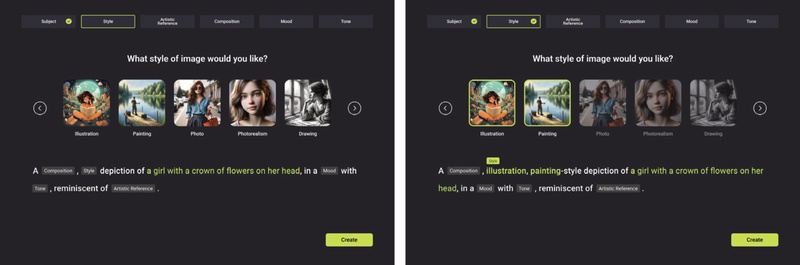
Category selection screen. Each category is briefly explained to guide novice users through essential aspects of prompt creation, helping them articulate subject matter, style, and other creative dimensions in a structured manner
To further support users who may be uncertain about how to describe specific visual attributes, each category provides up to 15 filters, resulting in a total of 65 options across all six categories. Each filter is presented with a representative image to offer immediate visual feedback—an approach grounded in formative study findings indicating that novices respond more effectively to concrete visual examples than to abstract textual descriptors. Users can apply multiple filters within and across categories, allowing combinations of stylistic, compositional, and emotional cues to generate more nuanced and intentional prompts.
The selected filters are dynamically reflected in the prompt window, eliminating the need for users to manually articulate or recall specialized terminology. Once selections are finalized and the “Create” button is activated, the system produces four high-quality image outputs that can be viewed, refined, or downloaded as needed Figure 2 illustrates how chosen filters are displayed within the interface, providing a transparent mapping between user selections and the resulting generated images. This design directly responds to participants’ desire for intuitive, visually grounded guidance and aims to reduce the extensive trial-and-error processes characteristic of free-form prompt input.
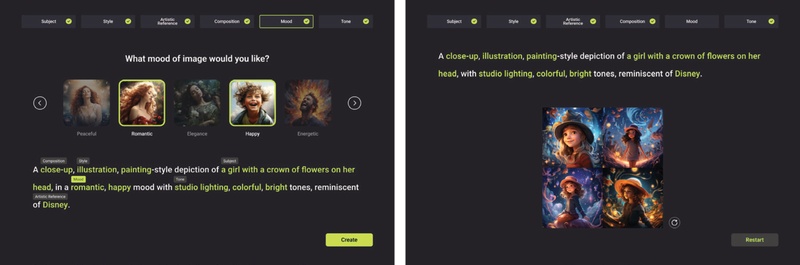
Filter selection interface and image results page. Multiple style, composition, and mood filters can be combined to refine user prompts visually
In response to the language barriers and conceptual challenges identified in the formative study, the proposed method incorporates a GPT-assisted recommendation system at the Subject stage. Users may input a brief description of the desired image, upon which the system provides five optimized prompt suggestions. These recommendations function to refine, expand, or rearticulate the user’s initial concept, thereby narrowing the gap between vague creative intentions and actionable textual prompts.
The system supports multiple languages, enabling non-native English speakers to convey nuanced ideas without loss of meaning during translation. Figure 3 illustrates the interface through which suggestions are presented, allowing users to accept, reject, or request additional alternatives. By pairing AI-generated textual guidance with explicit user agency, this feature alleviates the steep learning curve associated with traditional prompt formulation while ensuring that core artistic intent remains intact.
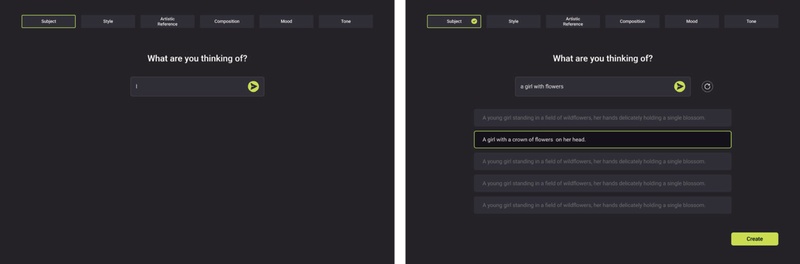
GPT-assisted prompt recommendation. The system suggests optimized prompts to address language barriers and refine user ideas
Collectively, these design decisions directly address the needs identified in the formative study, in which participants expressed a strong desire for structured guidance, visual aids, and linguistic support. Consequently, the interface of the proposed method is designed to balance creative freedom with user-friendly assistance, thereby facilitating a more seamless exploration of digital art creation for novice users.
5. 3. Technical Architecture and Implementation
Beyond its user-centric interface, the proposed method is implemented as a fully operational web service that integrates advanced AI components to support real-time creative exploration. Image generation is powered by an optimized diffusion model capable of producing high-quality outputs, while the prompt recommendation system leverages the ChatGPT API to generate contextually relevant suggestions that refine user inputs.
Developed in JavaScript using Next.js, the system benefits from server-side rendering and Server Actions, enabling smooth and efficient interaction with its AI modules. On the back end, the proposed method operates as an edge-runtime serverless application, incorporating Postgres for data management and AWS Lambda with EventTrigger for scheduling. To support reproducibility, a general description of the diffusion model architecture and its configuration is provided, while proprietary implementation details are omitted. This technical foundation provides a robust platform for evaluating how structured, guided interactions can empower digital creatives to explore and express their artistic visions.
6. Evaluating the Usability and Creative Efficacy of the Proposed Method
This chapter presents a comparative evaluation designed to assess both the usability of the proposed method and its effectiveness in supporting creative image generation. The proposed method is compared with Midjourney, a widely adopted text-to-image generation service, to examine whether its step-by-step interface enables novices to produce results that more closely align with their intended creative visions.
6. 1. Method
Sixteen participants (7 males, 9 females) with one to five prior interactions with generative AI services were recruited to ensure they remained within the novice range. Users with no prior experience were excluded to avoid confounding factors related to initial system exploration, and frequent users were omitted to preserve the study’s focus on beginner-level challenges. The final sample comprised 10 participants in their 20s and 6 in their 30s, representing a balanced distribution of early-career professionals and graduate students. Table 6 provides demographic information and details regarding prior experience with AI image generators.
Demographic analysis of participants in the comparative evaluation
An observational research design was employed in which participants were asked to generate images that closely resembled a reference provided by the researchers. Each participant used two tools: Midjourney and the proposed method. Midjourney served as the baseline system due to its widespread adoption and established user community, making it an appropriate point of comparison. To mitigate order effects, half of the participants began with Midjourney, while the remaining half started with the proposed method. After completing the tasks, participants completed the Computer System Usability Questionnaire (CSUQ) for both services. In-depth interviews were subsequently conducted to collect qualitative feedback regarding overall user satisfaction, perceived creative support, and suggestions for future refinement. The study was conducted between December 1 and December 31, 2023, and each session lasted approximately 70 minutes.
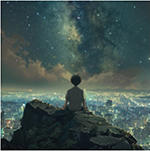
The primary task required participants to generate images that reflect key visual attributes of a shared reference. For Midjourney, participants manually composed text-based prompts, whereas for the proposed method, they followed the step-by-step interface. Observational data were recorded, including strategies used to refine prompts, the time taken to achieve a satisfactory result, and any obstacles encountered. Figure 4 presents the reference image that participants attempted to replicate.

Image presented by the research team
This mixed-methods approach enabled the collection of both quantitative metrics (e.g., usability scores) and qualitative insights (e.g., creative workflow, perceived control), providing a comprehensive understanding of the proposed method’s influence on creative efficacy.
6. 2. Results
Participants were instructed to generate an image depicting a boy viewed from behind as he observed the stars, using both Midjourney and the proposed method. This task revealed clear differences in how each platform supported creative control and facilitate alignment between intended visual attributes and generated outputs. Table 7 presents outputs from three representative participants, illustrating how the structured, filter-based workflow of the proposed method frequently produced results that more closely aligned with the intended visual concept.
Outputs created by participants in the task
For Participant A, Midjourney generated an image that did not reflect the intended sitting posture, instead depicting a standing figure. In contrast, selecting the “Back View” and “Sitting” options within the Composition category of the proposed method resulted in an output that accurately captured the target posture.
Participant B’s output in Midjourney also diverged from the intended atmosphere; the prompt “star fall at night” was misinterpreted as a seasonal reference, producing an autumn-themed scene rather than one characterized by vivid blue night tones. By applying the Makoto Shinkai–inspired filter under the Artistic Reference category in the proposed method, Participant B achieved the desired stylistic and atmospheric qualities with minimal refinement.
A similar pattern was observed for Participant C. The Midjourney prompt “man sitting on the huge tree” yielded an image showing a standing silhouette beside the tree, reflecting ambiguity in prompt interpretation. In contrast, the proposed method’s step-by-step selection process guided the participant toward choices that produced an output closely matching the reference image in terms of shape, composition, and spatial arrangement.
Across all participants, the proposed method’s filter-based interface consistently produced more accurate and detailed images than Midjourney’s open-ended prompt approach. The step-by-step selection of key attributes appeared to bridge the gap between abstract ideas and concrete visual outputs, offering novices a clearer pathway toward achieving their creative goals.
To quantitatively evaluate how effectively Midjourney and the proposed method support novice users, the Computer System Usability Questionnaire (CSUQ) (Lewis, 1995) was administered. Sixteen of the original 19 items were selected to align with the characteristics of web-based services, while three items related to error recovery and help documentation were excluded because such features were not implemented in the current prototype of the proposed method. Participants rated each of the 16 items on a 7-point Likert scale, providing numerical assessments of system usability, information quality, and interface design.
Table 8 presents the average scores for both systems. Across all items, the proposed method consistently outperformed Midjourney, with the most pronounced difference observed for Q12 ("The organization of information on the system screens is clear"), where Midjourney received a mean score of 3.88 compared to 6.13 for the proposed method. These findings correspond with the observational analysis, which indicated that participants experienced difficulty navigating Midjourney’s interface—particularly the reliance on the "/" character and command-line workflow—whereas the structured, step-by-step filter selection supported more intuitive interaction and learning within the proposed method.
CSUQ evaluation results for Midjourney and the Proposed Method
To examine whether the observed differences in CSUQ scores between Midjourney and the proposed method were statistically significant, a paired-samples t-test was conducted for each questionnaire item. The analysis revealed that the proposed method achieved significantly higher usability ratings than Midjourney across the majority of items (p < .05).
These results indicate that the differences reported in Table 8 are not attributable to random variation, but rather reflect systematic improvements in usability, information clarity, and interface organization afforded by the proposed method.
Figure 5 presents a comparative analysis across four key dimensions—system usefulness, information quality, interface quality, and overall satisfaction. The proposed method achieved higher scores in all dimensions, underscoring its user-friendly design and effective organization of information. Notably, Midjourney’s overall satisfaction score (5.06) was higher than might be expected given its interface-related challenges, suggesting that users continued to value the quality of its generated images. In contrast, the proposed method’s comparatively lower interface quality score (5.90) indicates areas for refinement, such as enhancing on-screen navigational cues. Overall, these results validate the effectiveness of the proposed method’s guided prompt approach while highlighting opportunities for further improvements to better support novice users.
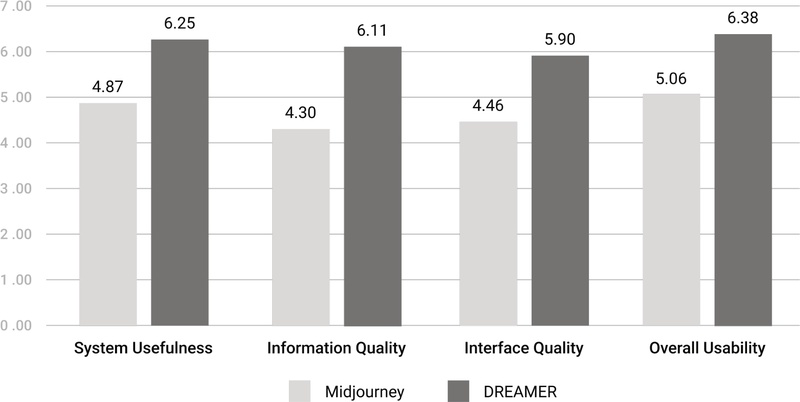
CSUQ survey score comparison for Midjourney and the proposed method
Following the usability evaluation, participants took part in in-depth interviews to elaborate on their experiences with Midjourney and the proposed method. A thematic analysis (Braun & Clarke, 2006) of the interview transcripts was conducted to examine how each platform supported or constrained users’ creative processes. Four themes emerged, reflecting perceptions of the proposed method’s structured approach, its support for detailed prompt creation, areas requiring interface refinement, and broader implications for digital creativity.
① Effectiveness of step-by-step format and predictable outcomes
Participants consistently emphasized that the step-by-step interface helped translate abstract ideas into more concrete prompts. Novice users who lacked familiarity with technical command structures found this guided approach particularly beneficial. As P2 noted, “The simple interface of the proposed method allowed me to quickly learn its features, and by selecting the desired effects step-by-step, I was able to create images easily.”
Example images accompanying each filter further enhanced predictability and reduced trial-and-error. P12 explained, “By looking at the filter images, I could better predict how my final output would look.” These insights underscore the importance of clear visual cues in reducing uncertainty and fostering user confidence during creative exploration.
② Support for detailed and professional prompt creation
Many participants reported difficulty articulating stylistic or compositional details when using Midjourney’s open-ended text prompts. The proposed method’s category-based structure offered a more accessible way to incorporate complex artistic elements such as Composition, Tone, and Mood. P1 stated, “Midjourney made it hard to think of the right words for style and tone, but with the proposed method, I could easily choose professional terms that refined my prompt.”
The GPT-assisted recommendation system further supported users in expanding vague or partially formed ideas, allowing them to establish clearer mental representations before generating final outputs. As P10 described, “The AI’s suggestions helped me shape my thoughts more clearly, so I could focus on the creative aspects rather than worrying about phrasing.” These findings demonstrate how structured guidance can empower novices to express nuanced creative intentions without requiring extensive expertise.
③ Need for improved interface intuition
Several participants identified opportunities to enhance the intuitiveness of the interface. P3 reported difficulty locating the arrow button for advancing to the next filter, pointing to a need for clearer navigation cues. P14 similarly noted that additional guidance for the Subject input field would help users determine the appropriate level of descriptive detail.
Ambiguities in filter names also posed challenges. P13 remarked, “I wasn’t sure how ‘Cinematic Light’ differed from ‘Dramatic Light,’ and it would help to have more descriptive visuals.” These observations highlight the need for improved clarity in filter labeling and more immediately recognizable interface elements to support seamless interaction.
④ Implications for digital creativity
Taken together, these themes highlight the capacity of structured, visually guided systems to support novice users in expressing complex artistic ideas. By reducing the guesswork associated with prompt formulation, the proposed method enabled participants to focus more on creative decision-making rather than on technical phrasing or command syntax.
These qualitative findings are consistent with prior research that has identified key limitations of free-form text prompting for novice users. Evirgen et al. (2024) report that iterative trial-and-error in prompt refinement imposes a substantial cognitive burden, while Morris (2024) argues that unconstrained text prompts often obscure system affordances and hinder users’ understanding of how inputs translate into outputs. The difficulties observed when participants used Midjourney—such as ambiguity in expressing composition, posture, or stylistic intent—closely align with these earlier findings.
In contrast, the effectiveness of the proposed method’s step-by-step and visually guided interaction reflects insights from prior work on structured guidance and human–AI collaboration. Research on interactive creative systems suggests that decomposing complex tasks into explicit stages can reduce cognitive load and improve user confidence, particularly for beginners (Grossman et al., 2009; Amershi et al., 2019). The present study extends this body of research by demonstrating that category-based filters and visual exemplars can further enhance predictability and perceived creative control in AI-driven image generation contexts.
Unlike earlier prompt-support approaches that primarily emphasize linguistic optimization or command refinement, the proposed method foregrounds visual and conceptual mediation between user intent and system output. This interface-centered approach suggests that visual guidance can complement language-based prompt engineering, particularly during early-stage creative exploration. Overall, these findings indicate that future digital creativity tools should balance intuitive, guided interactions with opportunities for deeper artistic exploration, enabling novice users to pursue their creative visions with greater clarity and confidence.
7. Discussion
This study examined how structured guidance in AI image generation can address the challenges novice users face in translating creative intent into effective prompts. Our findings—derived from usability evaluations, in-depth interviews, and comparative analyses with Midjourney—illustrate how tools such as the proposed method can empower digital creatives. The following sections interpret these findings in relation to the three research questions, considering both the strengths of the approach and areas that warrant further refinement.
7. 1. Addressing Novice Challenges in Prompt Composition (RQ1)
Novice participants reported uncertainty about how to structure prompts, select relevant terminology, and express abstract ideas. The proposed method’s six-category framework proved effective in mitigating these difficulties by guiding users through distinct stages of prompt creation (Subject, Style, Artistic Reference, Composition, Mood, Tone). This structured approach aligns with cognitive load theory (Sweller, 1988) and supports findings in industrial design research demonstrating the benefits of structured guidance when integrating text-to-image models (Barros & Ai, 2024), suggesting that well-defined steps can reduce mental effort for beginners.
Participants also praised the filter-based interface and visual examples, which helped them articulate nuanced stylistic preferences more easily. However, because some users reported difficulty distinguishing between similarly named filters or understanding certain terminology, further refinements—such as clearer naming conventions or additional preview images—may be necessary to support a broader range of creative goals and cultural contexts.
7. 2. Critical Interface Features for Supporting Artistic Expression (RQ2)
Our quantitative results and qualitative feedback underscore the importance of intuitive interface elements that empower users to experiment with creative ideas without fear of error. The proposed method’s step-by-step guide, visual filter selections, and GPT-assisted prompt recommendations collectively lower barriers to creative expression. The filter mechanism, which allows users to visually explore aspects such as composition, lighting, and style, echoes research on explainable AI and implicit interaction design (Bernsen, 2008; Ju & Leifer, 2008), demonstrating how clear visual cues can effectively bridge the gap between user intent and system output.
This multimodal approach not only minimizes trial-and-error but also actively encourages experimentation, aligning with principles of human–AI collaboration (Amershi et al., 2019) that emphasize interactive, transparent systems for enhanced creative workflows.
Nonetheless, participants identified certain shortcomings, including ambiguous filter names and non-intuitive navigational cues, highlighting areas where further refinement is needed to ensure universal accessibility. Future work should incorporate iterative design processes and personalized interface options to better accommodate diverse user preferences and cultural contexts.
7. 3. Impact on Creative Outcomes Compared to Existing Systems (RQ3)
Compared to Midjourney, the proposed method enabled participants to generate images that more closely aligned with their intended creative visions, particularly among users with limited prompt-writing experience. This effect was most pronounced in tasks requiring detailed compositional control or stylistic references, where the proposed method’s category-based interface provided clear affordances for specifying such elements. Participants reported that the structured approach improved outcome predictability and reduced frustration, a finding consistent with prior research on user satisfaction and perceived control in AI-supported systems (Maedche et al., 2019).
Importantly, the contribution of this study does not lie in directly enhancing creativity as an abstract or intrinsic outcome, but rather in improving the controllability and predictability with which users’ creative intentions are translated into AI-generated images through structured interface support. By externalizing prompt composition into explicit, visually guided choices, the proposed method enables novice users to more reliably articulate and realize their intended ideas, thereby reducing uncertainty inherent in open-ended prompt formulation.
Nevertheless, Midjourney’s relatively high overall satisfaction ratings suggest that its powerful image generation capabilities continue to appeal to users despite usability challenges associated with its command-based interface. This contrast highlights a broader design trade-off between expressive freedom and structured guidance. As suggested in prior work on adaptive human–AI interaction (Floridi & Chiriatti, 2020), future systems may benefit from interfaces that dynamically adjust levels of guidance according to user expertise, offering structured support for novices while preserving flexibility for more experienced creators.
7. 4. Limitations and Future Research
This study’s scope was limited by a relatively small and demographically narrow participant pool, which may constrain the generalizability of our findings. Additionally, the comparative evaluation with Midjourney alone provides an incomplete picture of how the proposed method might perform relative to other text-to-image platforms. Longitudinal research could further explore how users’ skills and perceptions evolve over time, particularly as they gain familiarity with structured prompt systems.
Including participants from more diverse cultural backgrounds, age groups, and creative domains would also offer richer insights into how interface design choices influence artistic exploration and user satisfaction. Lastly, although the tasks used in our evaluation effectively highlighted novice challenges, more open-ended or user-driven creative scenarios could reveal additional opportunities for the proposed method to support advanced or highly personalized artistic pursuits.
8. Conclusion
This study investigated how a structured, visually guided interface can support novice digital creatives in overcoming common obstacles in AI-driven image generation. By segmenting prompt creation into six core categories and providing filter-based visual aids, the proposed method reduced cognitive load, enhanced outcome predictability, and enabled users to more effectively align generated images with their creative intentions. The GPT-assisted recommendation component further addressed linguistic challenges and supported users in refining abstract concepts into actionable prompt elements.
Rather than claiming a direct enhancement of creativity itself, this research positions its primary contribution at the interface level—specifically, in facilitating the articulation, control, and predictability of creative intent within AI image generation workflows. The findings indicate that novices benefit from scaffolded, step-by-step interactions that lower uncertainty and improve confidence in navigating complex generative systems, aligning with established principles in human–AI collaboration, cognitive load theory, and user-centered design.
However, this study has several limitations. First, the participant sample size was relatively small and primarily focused on novice users, which limits the generalizability of the findings across broader user populations. Second, the evaluation tasks were designed around controlled, reference-based image generation scenarios; more open-ended, free-creation tasks may reveal different dimensions of creativity and interaction patterns that were not captured in the present study. Third, the system was evaluated against a single baseline platform, restricting comparative insights across the rapidly evolving ecosystem of AI image generation tools.
Future research should address these limitations by incorporating larger and more diverse participant groups, adopting longitudinal and open-ended creative evaluation tasks, and extending comparisons to additional text-to-image systems. Further exploration of adaptive interfaces that balance structured guidance with creative autonomy may provide deeper insight into how AI tools can inclusively support creative practice across varying levels of expertise. As AI-assisted creativity continues to evolve, interfaces that thoughtfully mediate between user intention and generative output remain a promising direction for accessible and meaningful digital art creation.
Acknowledgments
This research was supported by the Yonsei University Humanities and Social Sciences Field Creative Research Fund of 2025 (2025-22-0530)
Notes
Copyright : This is an Open Access article distributed under the terms of the Creative Commons Attribution Non-Commercial License (http://creativecommons.org/licenses/by-nc/3.0/), which permits unrestricted educational and non-commercial use, provided the original work is properly cited.
References
-
Amershi, S., Weld, D., Vorvoreanu, M., Fourney, A., Nushi, B., Collisson, P., Suh, J., Iqbal, S., Bennett, P. N., Inkpen, K., Teevan, J., Kikin-Gil, R., & Horvitz, E. (2019). Guidelines for human-AI interaction. In Proceedings of the 2019 CHI Conference on Human Factors in Computing Systems(CHI '19). Association for Computing Machinery, 1-13.
[https://doi.org/10.1145/3290605.3300233]

-
Balse, R., Valaboju, B., Singhal, S., Warriem, J. M., & Prasad, P. (2023). Investigating the potential of GPT-3 in providing feedback for programming assessments. In Proceedings of the 2023 Conference on Innovation and Technology in Computer Science Education V. 1(ITiCSE 2023). Association for Computing Machinery, 292-298.
[https://doi.org/10.1145/3587102.3588852]
-
Barros, M., & Ai, Q. (2024). Designing with words: exploring the integration of text-to-image models in industrial design. Digital Creativity, 35(4), 378-391.
[https://doi.org/10.1080/14626268.2024.2411223]
-
Bernsen, N. O. (2008). Multimodality theory. In D. Tzovaras (Ed.), Multimodal user interfaces: From signals to interaction(pp. 25-43). Berlin, Heidelberg: Springer Berlin Heidelberg.
[https://doi.org/10.1007/978-3-540-78345-9_2]
-
Boden, M. A. (2004). The creative mind: Myths and mechanisms. London, United Kingdom: Routledge.
[https://doi.org/10.4324/9780203508527]
-
Brade, S., Wang, B., Sousa, M., Oore, S., & Grossman, T. (2023, October). Promptify: Text-to-image generation through interactive prompt exploration with large language models. In Proceedings of the 36th Annual ACM Symposium on User Interface Software and Technology (UIST '23). Association for Computing Machinery, 1-14.
[https://doi.org/10.1145/3586183.3606725]
-
Brand, L., Humm, B. G., Krajewski, A., & Zender, A. (2023). Towards improved user experience for artificial intelligence systems. In: Iliadis, L., Maglogiannis, I., Alonso, S., Jayne, C., Pimenidis, E. (eds) Engineering Applications of Neural Networks. Springer, Cham.
[https://doi.org/10.1007/978-3-031-34204-2_4]
-
Braun, V., & Clarke, V. (2006). Using thematic analysis in psychology. Qualitative Research in Psychology, 3(2), 77-101.
[https://doi.org/10.1191/1478088706qp063oa]
- Brown, T., Mann, B., Ryder, N., Subbiah, M., Kaplan, J. D., Dhariwal, P., ... & Amodei, D. (2020). Language models are few-shot learners. Advances in neural information processing systems, 33, 1877-1901.
-
Dehouche, N., & Dehouche, K. (2023). What's in a text-to-image prompt? The potential of stable diffusion in visual arts education. Heliyon, 9(6).
[https://doi.org/10.1016/j.heliyon.2023.e16757]
- Diab, M., Herrera, J., Sleep, M., Chernow, B., & Mao, C. (2022). Stable diffusion prompt book. Retrieved February 1, 2025, from https://openart.ai/promptbook.
-
Dang, H., Mecke, L., Lehmann, F., Goller, S., & Buschek, D. (2022). How to prompt? Opportunities and challenges of zero-and few-shot learning for human-AI interaction in creative applications of generative models. arXiv:2209.01390 [cs.HC].
[https://doi.org/10.48550/arXiv.2209.01390]
-
Evirgen, N., Wang, R., & Chen, X. A. (2024). From text to pixels: Enhancing user understanding through text-to-image model explanations. In Proceedings of the 29th International Conference on Intelligent User Interfaces(IUI '24). Association for Computing Machinery, 74-87.
[https://doi.org/10.1145/3640543.3645173]
-
Feng, Y., Wang, X., Wong, K. K., Wang, S., Lu, Y., Zhu, M., ... & Chen, W. (2023). PromptMagician: Interactive Prompt Engineering for Text-to-Image Creation. IEEE Transactions on Visualization and Computer Graphics, 30(1), 295-305.
[https://doi.org/10.1109/TVCG.2023.3327168]
-
Floridi, L., & Chiriatti, M. (2020). GPT-3: Its nature, scope, limits, and consequences. Minds and Machines, 30, 681-694.
[https://doi.org/10.1007/s11023-020-09548-1]
-
Grossman, T., Fitzmaurice, G., & Attar, R. (2009). A survey of software learnability: Metrics, methodologies, and guidelines. In Proceedings of the SIGCHI Conference on Human Factors in Computing Systems(CHI '09). Association for Computing Machinery, 649-658.
[https://doi.org/10.1145/1518701.1518803]
-
Hassenzahl, M. (2010). Experience design: Technology for all the right reasons. San Rafael, CA: Morgan & Claypool Publishers.
[https://doi.org/10.1007/978-3-031-02191-6]
-
Ju, W., & Leifer, L. (2008). The design of implicit interactions: Making interactive systems less obnoxious. Design Issues, 24(3), 72-84.
[https://doi.org/10.1162/desi.2008.24.3.72]
-
Lewis, J. R. (1995). IBM computer usability satisfaction questionnaires: Psychometric evaluation and instructions for use. International Journal of Human-Computer Interaction, 7(1), 57-78.
[https://doi.org/10.1080/10447319509526110]
-
Luger, E., & Sellen, A. (2016). "Like having a really bad PA": The gulf between user expectations and experience of conversational agents. In Proceedings of the 2016 CHI Conference on Human Factors in Computing Systems(CHI '16). Association for Computing Machinery, 5286-5297.
[https://doi.org/10.1145/2858036.2858288]
-
Maedche, A., Legner, C., Benlian, A., Berger, B., Gimpel, H., Hess, T., Hinz, O., Morana, S., & Söllner, M. (2019). AI-based digital assistants: Opportunities, threats, and research perspectives. Business & Information Systems Engineering, 61, 535-544.
[https://doi.org/10.1007/s12599-019-00600-8]
-
McCormack, J., Gifford, T., & Hutchings, P. (2019, April). Autonomy, Authenticity, Authorship and Intention in Computer Generated Art. In: Ekárt, A., Liapis, A., Castro Pena, M.L. (eds) Computational Intelligence in Music, Sound, Art and Design. Springer, Cham.
[https://doi.org/10.1007/978-3-030-16667-0_3]
-
Morris, M. R. (2024). Prompting considered harmful. Communications of the ACM, 67(12), 28-30.
[https://doi.org/10.1145/3673861]
- Norman, D. (2013). The design of everyday things. New York, NY: Basic Books.
- OpenAI. (2023). DALL∙E 3. Retrieved February 1, 2025, from https://openai.com/dall-e-3.
-
Oppenlaender, J. (2022). The creativity of text-to-image generation. In Proceedings of the 25th International Academic Mindtrek Conference(Academic Mindtrek '22). Association for Computing Machinery, 192-202.
[https://doi.org/10.1145/3569219.3569352]
-
Oppenlaender, J. (2023). A taxonomy of prompt modifiers for text-to-image generation. Behaviour & Information Technology, 43(15), 3763-3776.
[https://doi.org/10.1080/0144929X.2023.2286532]
- Parsons, G. (2022). DALLE∙2 prompt book. Retrieved February 1, 2025, from https://dallery.gallery/the-dalle-2-prompt-book/.
-
Pavlichenko, N., & Ustalov, D. (2023). Best prompts for text-to-image models and how to find them. In Proceedings of the 46th International ACM SIGIR Conference on Research and Development in Information Retrieval(SIGIR '23). Association for Computing Machinery, 2067-2071.
[https://doi.org/10.1145/3539618.3592000]
-
Pirolli, P., & Card, S. (1999). Information foraging. Psychological Review, 106(4), 643-675.
[https://doi.org/10.1037/0033-295X.106.4.643]
- Polaris Market Research. (2024). Generative AI market share, size, trends, industry analysis report, 2024-2032. Retrieved February 1, 2025, from https://polarismarketresearch.com/industry-analysis/generative-ai-market.
-
Ramesh, A., Dhariwal, P., Nichol, A., Chu, C., & Chen, M. (2022). Hierarchical text-conditional image generation with CLIP latents. arXiv:2204.06125[cs.CV].
[https://doi.org/10.48550/arXiv.2204.06125]
-
Sanchez, T. (2023). Examining the text-to-image community of practice: Why and how do people prompt generative AIs? In Proceedings of the 15th Conference on Creativity and Cognition(C&C '23). Association for Computing Machinery, 43-61.
[https://doi.org/10.1145/3591196.3593051]
-
Sengers, P., Boehner, K., David, S., & Kaye, J. J. (2005, August). Reflective design. In Proceedings of the 4th decennial conference on Critical computing: between sense and sensibility (CC '05). Association for Computing Machinery, 49-58.
[https://doi.org/10.1145/1094562.1094569]
-
Shneiderman, B. (2020). Human-centered artificial intelligence: Reliable, safe & trustworthy. International Journal of Human-Computer Interaction, 36(6), 495-504.
[https://doi.org/10.1080/10447318.2020.1741118]
-
Sweller, J. (1988). Cognitive load during problem solving: Effects on learning. Cognitive Science, 12(2), 257-285.
[https://doi.org/10.1207/s15516709cog1202_4]
-
Wang, Z., Huang, Y., Song, D., Ma, L., & Zhang, T. (2024, May). Promptcharm: Text-to-image generation through multi-modal prompting and refinement. In Proceedings of the 2024 CHI Conference on Human Factors in Computing Systems (CHI '24). Association for Computing Machinery, 1-21.
[https://doi.org/10.1145/3613904.3642803]
-
White, J., Fu, Q., Hays, S., Sandborn, M., Olea, C., Gilbert, H., Elnashar, A., Spencer-Smith, J., & Schmidt, D. C. (2023). A prompt pattern catalog to enhance prompt engineering with ChatGPT. arXiv:2302.11382[cs.SE].
[https://doi.org/10.48550/arXiv.2302.11382]
-
Zhao, W. X., Zhou, K., Li, J., Tang, T., Wang, X., Hou, Y., Min, Y., Zhang, B., Zhang, J., Dong, Z., Du, Y., Yang, C., Chen, Y., Chen, Z., Jiang, J., Ren, R., Li, Y., Tang, X., Liu, Z., ... Wen, J. R. (2023). A survey of large language models. arXiv:2303.18223[cs.CL].
[https://doi.org/10.48550/arXiv.2303.18223]
-
Zhou, Y., Muresanu, A. I., Han, Z., Paster, K., Pitis, S., Chan, H., & Ba, J. (2022). Large language models are human-level prompt engineers. arXiv:2211.01910[cs.LG].
[https://doi.org/10.48550/arXiv.2211.01910]
-
Zhang, C., Zhang, C., Zhang, M., & Kweon, I. S. (2023). Text-to-image diffusion models in Generative AI: a survey. arXiv:2303.07909 [cs.CV].
[https://doi.org/10.48550/arXiv.2303.07909]